

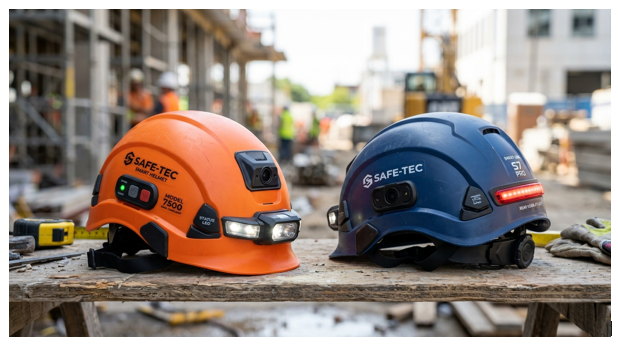
Hat’s off to hard helmets-more or less for about a century, already. Their purpose hasn’t altered: take a hit and stop falling debris. But the potential of headgear goes far beyond that; and a smart safety helmet does more than just provide head protection-it combines digital features such as sensors, communication devices and even cameras to enhance safety on any site.
Read on to learn about smart helmets, what they do, which ones make sense, and what to consider before buying one.
What Is a Smart Safety Helmet?
Smart safety helmets are industrial safety helmets that have an electrically certified protective shell coupled with electronic sensors. The shells may be capable of capturing:
- Motion and impact sensors
- GPS or indoor positioning modules
- Gas, temperature, or noise sensors
- A built-in camera and microphone
- Wireless connectivity (Bluetooth, Wi-Fi, or cellular)
- A heads-up display or visor-mounted screen
- Emergency buttons and alert lights
The electronics don’t replace the protective value of the helmet. As a form of Smart PPE, A smart helmet still needs to adhere to standards for head protection, but the electronics are simply an add-on.
Standout Features and Their Functions
Impact and fall detection. An accelerometer can sense when an impact or fall occurs and will automatically notify a supervisor, providing the worker’s location. This is critical when the worker is alone or in a location hidden from view.
Position tracking. Location systems give supervisors a sense of where employees are, useful for large fields, tunnels, and mines and emergency evacuations. It also prevents people from entering forbidden areas and dangerous environments.
Environmental monitoring. Certain helmets are equipped to measure temperature, humidity, noise levels, or the presence of specific gases. These early warning systems can give workers time to get clear before the environment reaches a hazardous level.
Fatigue and heat stress alarms. Sensors worn can identify potential fatigue or heat stress, major risk factors for accidents in hot conditions or during long shifts.
Two-way communication. Built-in microphones and speakers let workers talk hands-free, even where noise makes ordinary conversation hard. This reduces the need to stop work and handle a radio.
Camera and remote support. A camera attached to a helmet allows remote specialists to see what the worker can see, providing advice on how to conduct a repair, inspection, or emergency response, or enabling training or review.
AR displays. Some of the higher end models can throw instructions, checklists or warnings onto the eyepiece.
Industries That Benefit Most
- Construction: Location identification and quick notifications are beneficial in the event of falls, being struck, or a congested work site.
- Mining and tunneling: Difficult visibility, the risk of hazardous gases, and limited ability for two-way communication increase the importance of accurate location and environmental sensing.
- Oil, gas, and chemical plants: Hazardous atmospheres call for gas detection and, in some zones, specially certified equipment.
- Utility and power lines: Remote video specialists enable crews to focus on repairs that are difficult to reach.
- Factory work & storage: Heavy machinery safety is increased thanks to the use of collision alerts and lone worker monitoring.
Benefits
- Quick help. Quick alerts reduce the time it takes for help to arrive following an incident.
- Improved risk recognition. If you’re accessing your data in real time, the chance of facing a hazardous situation goes down.
- Better communication. Hands free, clear communication diminishes errors in isolated or loud places.
- Prevention data. Incident and movement data over time will highlight trends – like near misses in the same zone again and again – so managers can eliminate the root cause.
- More training. Real examples from recorded or live footage for coaching.
Limitations and Concerns
Helmets are helpful, but still not enough.
- Expense. They are much pricier than basic helmets, and there may be subscription fees for software or connectivity.
- Weight, comfort. Extra electronics can bring some weight to the helmet, or generate heat. Poor comfort leads to workers wearing helmet incorrectly, or not at all.
- Battery life. The lights on your helmet are gone by the time you’re halfway through your shift; time to think about how you’re going to plug it in.
- Connectivity gaps. Signals are absent at underground or remote locations, investigate how the system operates when disconnected.
- Privacy. Location tracking, cameras and health monitoring are concerns for good reason.
- Workers need to know what’s being collected, for what purpose, who has access to it and how long it will be stored.
- Over-reliance. Alerts are designed to support good safety practices, not to take the place of training, supervision, risk assessments or other controls.
Things to Watch Out for Before Purchasing
Protection certification. Make sure the helmet complies with the head protection standard mandated at your workplace, whether ANSI/ISEA Z89.1 (United States), EN 397 (Europe), or the relevant Bureau of Indian Standards standard. But it should retain its certification after you apply accessories or electronics to it, so check with the manufacturer.
Hazardous-area ratings. If it’s likely that people will get within reach of combustible gases or dust, then their electronics need to be certified for the sale zone they will be in.
Durability ratings. Find dust and water resistance appropriate to where you’ll be, and see what temperature the device can handle.
Battery and charging. Inquire about real-life battery life, how long a charge takes and if you can swap out batteries.
Software and data policy. Know where your data will reside, how it will be protected and if you will be able to export it.
Comfort and fit. Conduct a trial with real workers in various head sizes and at various tasks before fully deploying.
Warranty and help. Find out what service the manufacturer offers and what their replacement policy is, and also the helmet’s service life.
Hints for a Successful Rollout
- Begin with a trial run. Trial with a small group, learn, and then grow.
- Involve the workers from the beginning. Provide clear reasons, particularly concerning about cameras and tracking to increase trust not suspicion.
- Establish data guidelines. Document what’s gathered and who has access to it.
- Instruct all staff. Employees should be familiar with the purpose of each and how they are used.
- Clean often. Look for cracks in shells, test straps and suspension, and clean sensors, and test emergency function. Throw away after a hard impact or the manufacturer’s suggested number of years.
Conclusion
Smart safety helmets make head protection more than a simple physical barrier by providing a networked device that senses a threat, activates a call for help, and keeps workers aware. Only if the helmet is certified and tailored to the hazards it detects, if the privacy of the worker is guarded, and if the device is integrated with good safety management practices will a smart helmet add value to safety efforts – but never replace them.